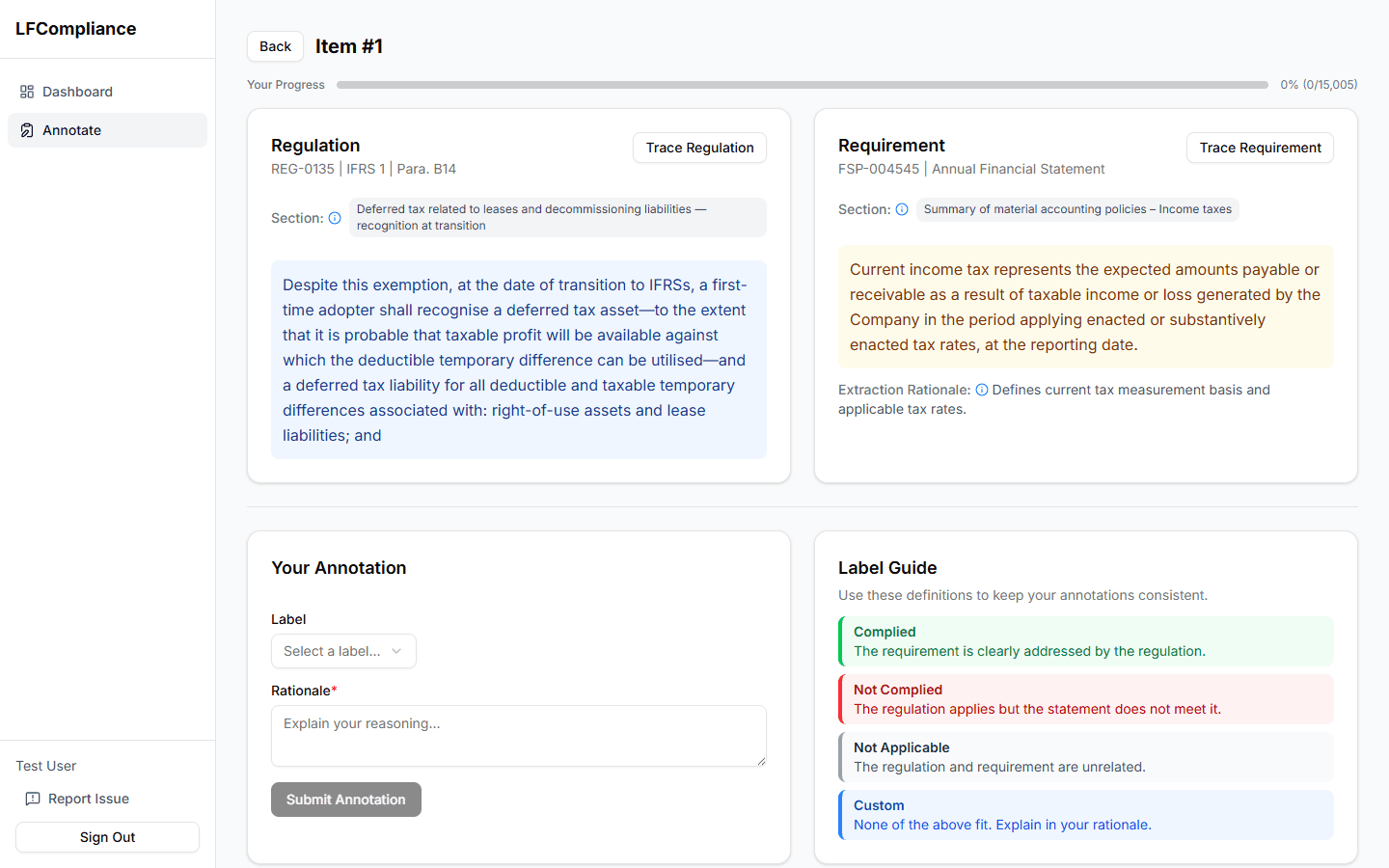
Annotating an Item
The core of the annotation workflow.
Regulation & Disclosure panels
The page is split into two panels showing the full text of the regulation and the disclosure. Each panel includes the source document metadata.
The regulation panel displays the full IFRS regulation text. At the top you'll see the IFRS standard name (e.g., IFRS 15), section title, and paragraph reference.
Use the "Trace to PDF" button to open the original IFRS document at the exact page where this regulation appears.
Section metadata
Below each panel, metadata shows which IFRS standard or financial statement section the text belongs to, helping you understand the broader context.
Trace to PDF buttons
Click "Trace to PDF" to open the source document in the built-in PDF viewer. The viewer automatically navigates to the correct page.
Annotation form
Select your compliance judgment from the three options: Yes (complied), No (not complied), or Not Applicable. Your selection is saved immediately.
Previous / Next navigation
Use the Prev and Next buttons to move between items without returning to the list.